

Apple has begun silently installing lightweight security patches in the background on iPhone, iPad and Mac after rolling out iOS 26.1, iPadOS 26.1 and macOS 26.1. The move aims to close urgent security gaps between major OS releases without forcing users to download full updates.
Why Apple is shifting to background security fixes
For years, Apple’s strong security posture has depended on users installing updates quickly. But many people delay updates—some avoid frequent prompts, others worry updates will slow older devices. That hesitation creates a dangerous window attackers can exploit, especially for high-impact, zero-day vulnerabilities.
To narrow that window, Apple separates critical security repairs from full system upgrades. The new "Background Security Improvements" mechanism pushes small, targeted patches—often focused on browsers and web frameworks—directly to devices without requiring user action or a complete OS update.
What these patches actually do
These are not full system updates. Instead, Apple delivers compact fixes that repair commonly targeted components—most notably Safari and the WebKit framework. Because many zero-day exploits are delivered through web content, hardening WebKit quickly can significantly reduce risk.
In practice, that means if a critical WebKit flaw is found, Apple can patch the vulnerable code remotely and close the exploit path long before a numbered OS update (for example, iOS 26.1.1) is published and installed by users.
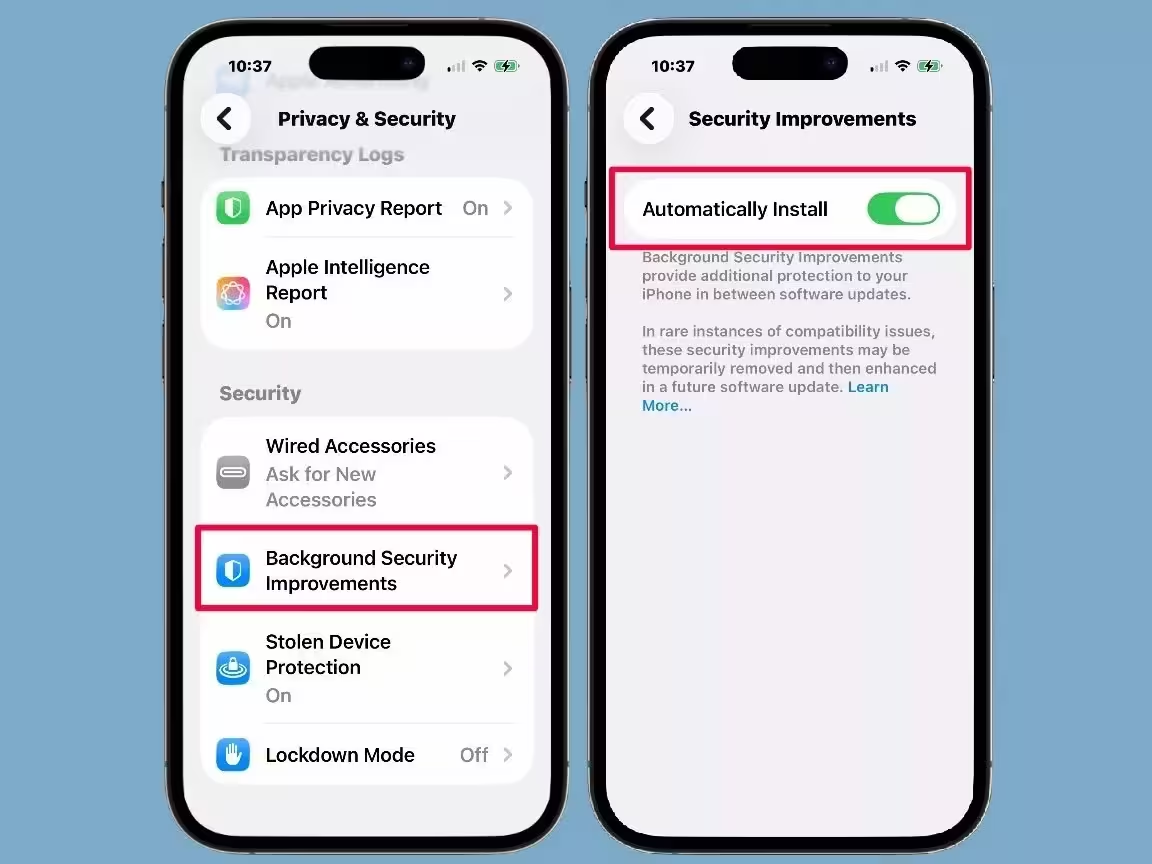
Enabled by default, but you can opt out
The feature is enabled by default in the latest releases, yet Apple gives experienced users the choice to disable it if they prefer full control over each change on their device. Be aware: turning it off delays important protections until the next full update and may leave your device exposed.
How to turn off automatic background security patches
- On iPhone and iPad: Open Settings > Privacy & Security > find "Background Security Improvements" and toggle "Automatically Install" off.
- On Mac: Open System Settings > Privacy & Security and scroll to the bottom to find the "Background Security Improvements" option.
Ultimately, this change reflects a trade-off: greater safety for the majority of users versus absolute control for power users. For most people, leaving background security updates enabled offers an unobtrusive way to stay protected against the most dangerous, fast-moving threats.


Leave a Comment
Comments
No comments yet. Be the first.