
3 Minutes
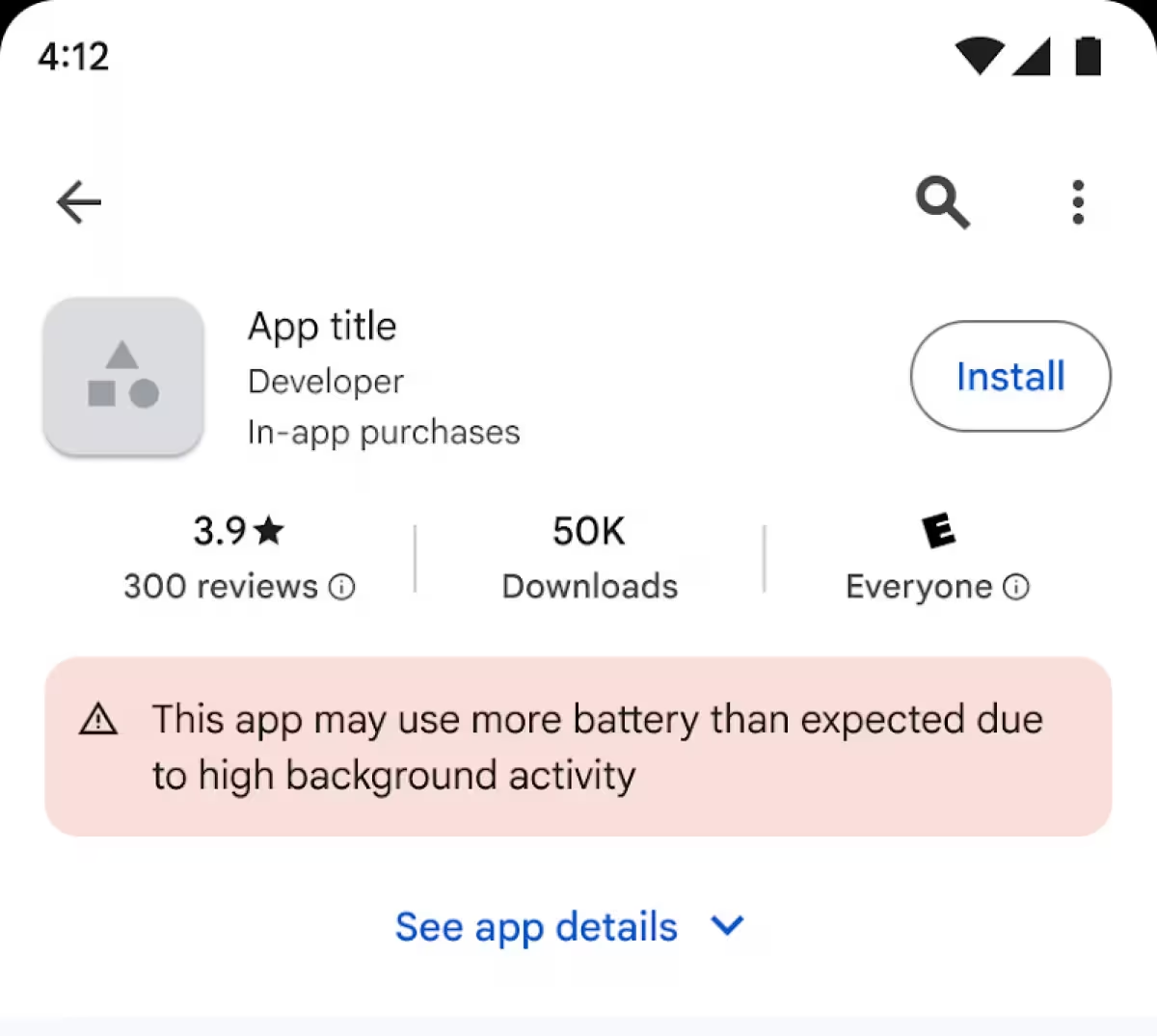
Google is rolling out a new safety measure in the Play Store: starting March 1, 2026, apps that keep phones awake with heavy background activity may be flagged for causing faster battery drain. The change is meant to help users spot battery-hungry apps and encourage developers to optimize background behavior.
How Google will flag battery-hungry apps
In a recent update, Google introduced an "excessive partial wake lock" metric — first tested in beta earlier this year — to identify apps that prevent an Android device from sleeping. If an app crosses a set "bad behavior threshold," Google may add a warning to its Play Store listing and reduce the app's visibility in recommendations.
What the metric measures and the thresholds
The metric was developed with Samsung and is now available to all Android developers. Google defines a problematic app as one that holds more than two hours of non-exempt wake locks within a 24-hour window. Not all wake locks count: essential uses such as audio playback or active data transfers are excluded.
There’s also a usage-based trigger: if 5% or more of an app’s user sessions show excessive wake locks within a 28-day period, the app is considered to have crossed the bad behavior threshold. Apps that meet that condition risk being excluded from Play Store recommendations and may show a battery-drain warning on their store page.
What this means for users and developers
For users, the change should make it easier to spot apps that are likely to shorten battery life. If you see a warning, consider updating the app, limiting its background activity, or exploring alternatives. Checking Android’s Battery settings and uninstalling rarely used apps remain simple, effective steps.
For developers, the message is clear: audit background work and reduce unnecessary wake locks. Use Android APIs like WorkManager and JobScheduler for deferred tasks, prefer foreground services only when strictly needed, and test apps against the new metric. Google has made the metric available so developers can monitor and fix issues before a listing warning appears.
Why this matters
Battery performance is a daily user pain point — apps that hold wake locks unnecessarily drain power and degrade the overall experience. By surfacing a measurable signal in the Play Store, Google is nudging both users and creators toward better battery hygiene. Expect more transparency in app behavior, and fewer surprises when your phone dies early on a long day out.
If you’re a developer, start reviewing wake-lock behavior now. If you’re a user, keep an eye on Play Store labels and review app permissions and background activity to protect battery life.







Leave a Comment
Comments
No comments yet. Be the first.