

2 Minutes
Open your browser, log into WhatsApp Web, and you may soon be able to tap a call icon instead of reaching for your phone. It’s a small change for everyday users, but a big one for anyone who has relied on the mobile app for voice and video calling since WhatsApp Web launched in 2015.
WhatsApp’s beta channel is rolling out one-to-one voice and video calling to desktop users. The initial release is limited: individual calls only, and only for subscribers enrolled in the WhatsApp Web beta program. If you’re in that group, expect the option to place a call from the browser and to share your screen during a session — handy for quick demos or remote troubleshooting.
What’s not here yet: group calls. WhatsApp says support for multi-party conversations will arrive later, and when it does, the plan is ambitious — group calls scaling up to 32 participants. The company also hinted at features like call links and scheduled calls appearing gradually, bringing the web experience closer to what people already enjoy on mobile.
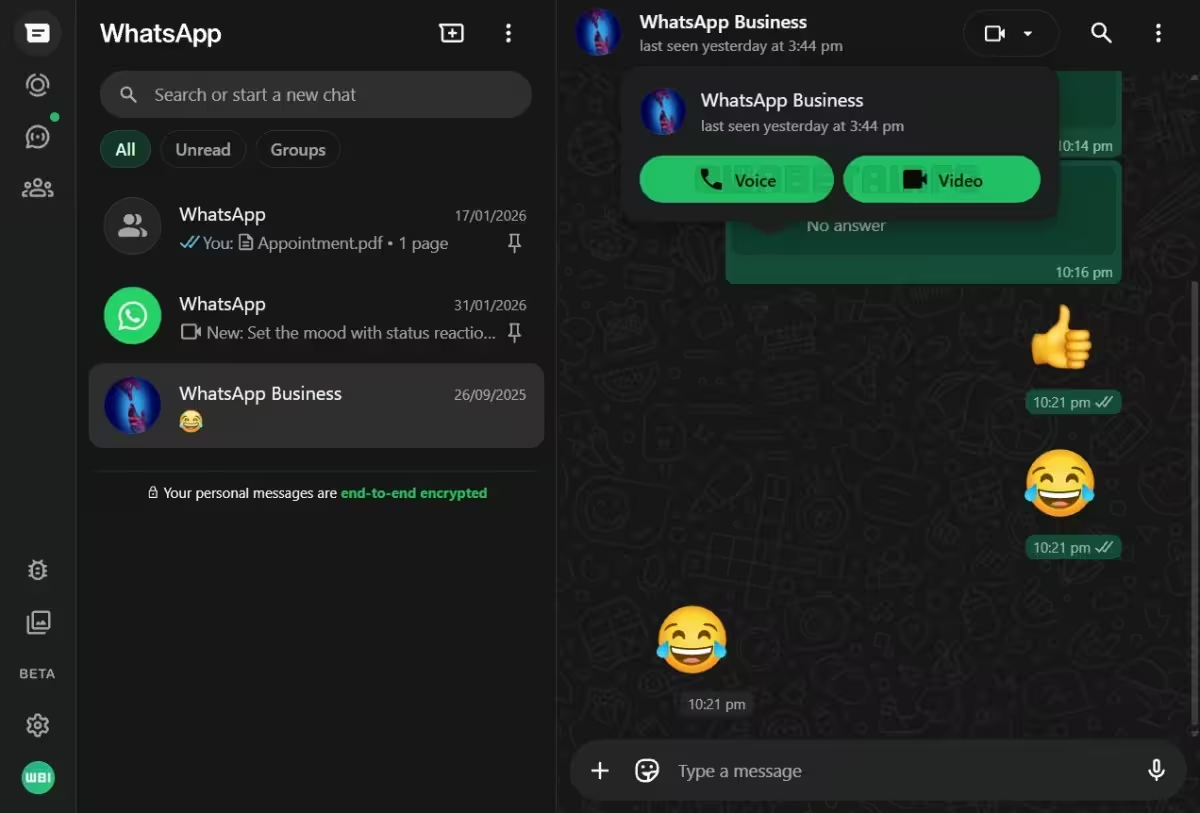
Privacy will remain the headline. Calls placed through WhatsApp Web are protected with end-to-end encryption using the Signal protocol, the same cryptographic foundation that secures WhatsApp’s mobile calling. In short: your browser call should be private in the same way as a phone call through the app.
There are a few practical things to note. Calls on the web rely on your browser’s microphone and camera permissions, and the quality will depend on your network and hardware. Since the rollout is incremental, not everyone will see the feature right away — patience is required while WhatsApp expands availability to more beta testers and, eventually, the wider user base.
The desktop shift closes a long-standing gap. For power users who juggle tabs, multitask across apps, or run remote support from a laptop, having calls natively in WhatsApp Web changes workflows in subtle but meaningful ways. It’s one more sign that the line between mobile and desktop communication is blurring.
If you want to try it today, join the WhatsApp Web beta and check for the call button in your browser session — then test mic, camera, and screen sharing before you rely on it for an important meeting.
Expect the feature set to expand. Calls for groups, richer scheduling tools, and easier sharing options are likely next. And when that day comes, more of us will probably stop switching devices mid-conversation.









Leave a Comment
Comments
No comments yet. Be the first.