

WhatsApp is testing a new privacy control that gives users granular choice over who can see their phone number. The change was uncovered by WABetaInfo in beta version 2.26.45.1 of WhatsApp for Android and builds on the Username feature WhatsApp introduced in June.
The Username rollout is not complete, though users can already reserve their names. WhatsApp framed usernames around privacy, enabling people to communicate without exchanging phone numbers. The new setting takes that idea further by letting users decide who can view their number in calls and chats.
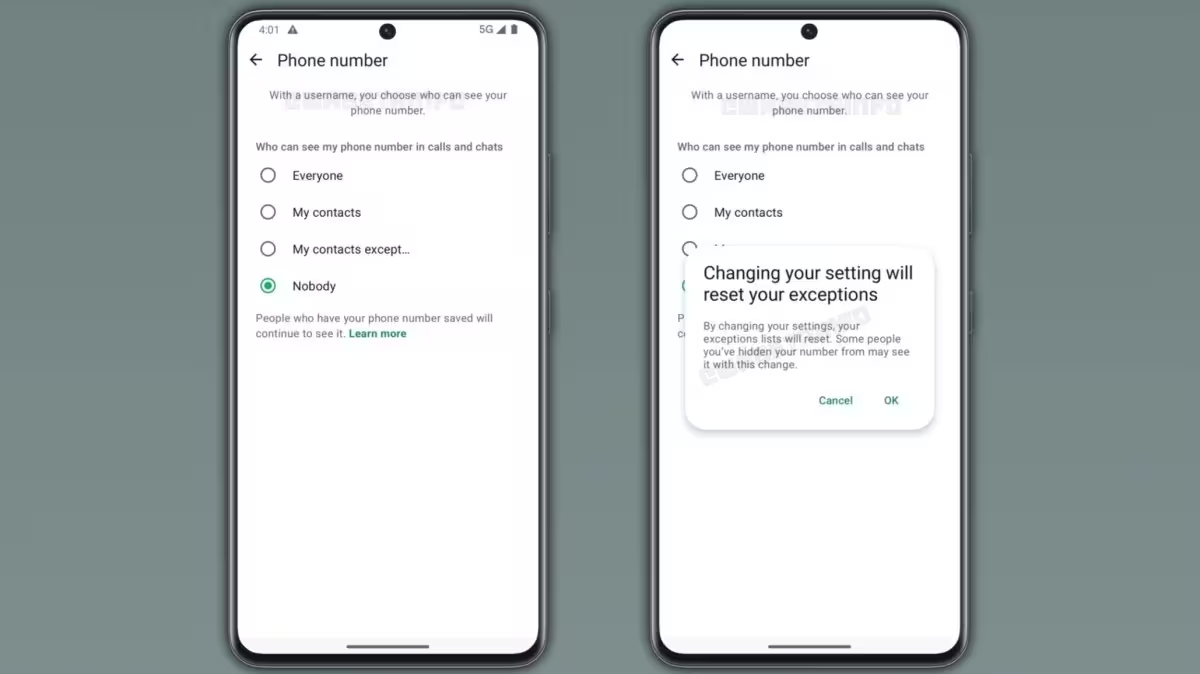
Four visibility options, but with conditions
According to WABetaInfo, the phone number privacy control offers four choices: 'Everyone', 'My contacts', 'My contacts except...', and 'Nobody'. These options apply to both calls and chats. However, the control will only be available to accounts that have a username. WhatsApp will continue to show your number to anyone who already knows it, the report notes.
Under the current behavior, WhatsApp already hides your phone number from people who contact you via your username. With the new control, the default visibility will be 'Nobody', so users who want to keep their number private will not need to change any settings. Those who need their number visible for business or other reasons can switch to a more permissive option.
This feature remains under development. It is not yet available to beta testers, and WABetaInfo says we must wait for WhatsApp to publish it on the beta channel before a public release.


Leave a Comment
Comments
No comments yet. Be the first.