

3 Minutes
OpenAI is rolling out a new group chat feature for ChatGPT that turns one-on-one conversations into shared, collaborative threads. Designed to combine human discussion with on-demand AI assistance, the feature is launching in select markets and comes with new social behaviors and model upgrades.
How ChatGPT group chats work — simple, fast, and familiar
Starting or joining a group is straightforward. Tap the people icon in the top-right of any chat to begin a new group or invite others into an existing conversation. First-time group members set up a brief profile with name, username and photo so participants can identify each other.
- Invite others with a shareable link; groups support up to 20 people.
- Sharing a link lets people join the conversation directly.
- Adding someone to an existing chat creates a copy as a new group chat, leaving the original private conversation intact.
- All group chats live in a clearly labeled sidebar section for quick access.
Smarter responses powered by GPT‑5.1 Auto
The AI in group chats runs on OpenAI's new GPT‑5.1 Auto. That means ChatGPT can pick the best GPT‑5.1 variant for a prompt based on what’s available under a user’s subscription. So whether you're brainstorming, troubleshooting code, or drafting copy, the model adapts to the task and your plan.
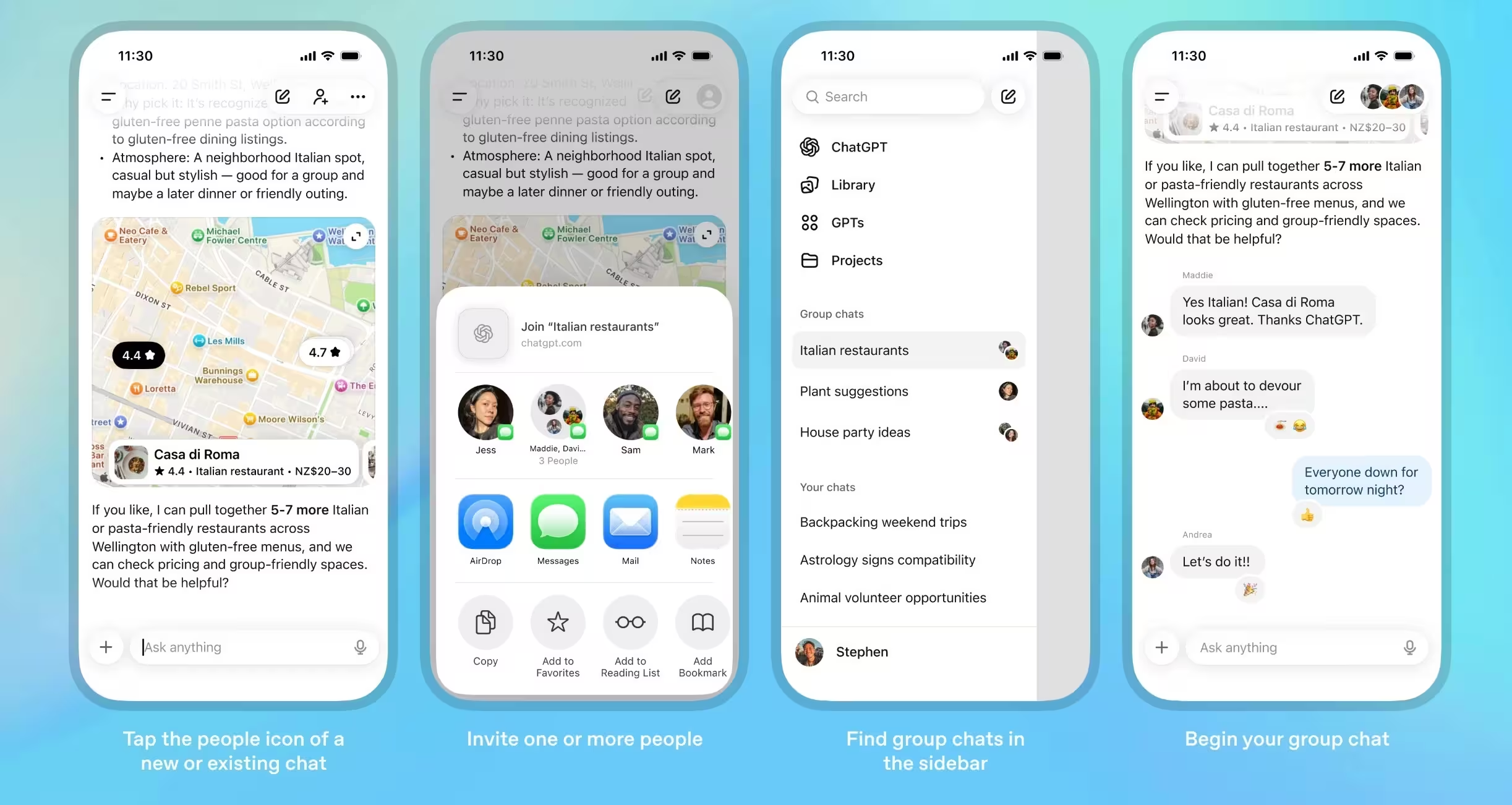
All the familiar ChatGPT tools are available inside groups: web search, image and file uploads, image generation, and voice dictation. And to make interactions feel more human, ChatGPT now reacts with emojis and follows conversational cues instead of replying to every message automatically.
New social behaviors: less noise, more context
OpenAI tweaked ChatGPT’s behavior for group dynamics. The assistant watches the conversation and chooses when to jump in. Want a direct reply? Mention ChatGPT in your message to call it out. Want a quieter thread? Mute or set custom instructions for that group so the assistant responds the way your team prefers.
Practical controls include customizing group names, adding or removing people, muting notifications, and setting unique response instructions per group. Together, these features make ChatGPT feel like a participant, not an inbox filler.
Rate limits, privacy and practical notes
OpenAI says rate limits apply only when the assistant responds; messages between human participants in the group don’t count toward those limits. That helps preserve fluid conversation while keeping AI usage predictable under subscription rules.
Where you can use it today
This group chat experience is rolling out to ChatGPT Free, Go, Plus and Pro users on mobile and web in Japan, New Zealand, South Korea and Taiwan. OpenAI plans to refine the experience based on early feedback and expand to more regions and plans over time.
Imagine planning a trip, live-debugging an app with colleagues, or co-writing an article — all with ChatGPT available to jump in when useful. That’s the promise here: collaborative human conversation with the option of expert-level AI help, right in the same thread.
.avif "OpenAI Gears Up for GPT-5 Launch with Advanced Reasoning Integration and Open-Weight Model Release")













Leave a Comment
Comments
No comments yet. Be the first.