

WhatsApp has begun rolling out scheduled messages to some iOS beta users, distributing the feature through TestFlight in build 26.42.10.19. The move follows an Android beta test that began earlier this month and arrives after the capability had been in development since at least February.
How it works
The scheduling flow on iOS mirrors the Android approach. After composing a message, tap and hold the send button to open a date and time picker, then confirm with the green button at the bottom, which shows the exact delivery time. You can schedule a message as soon as 10 minutes from now and as far ahead as two weeks. WhatsApp says the message will be sent at the set time even if your device is offline, and the scheduling confirmation that appears in the chat is visible only to you.
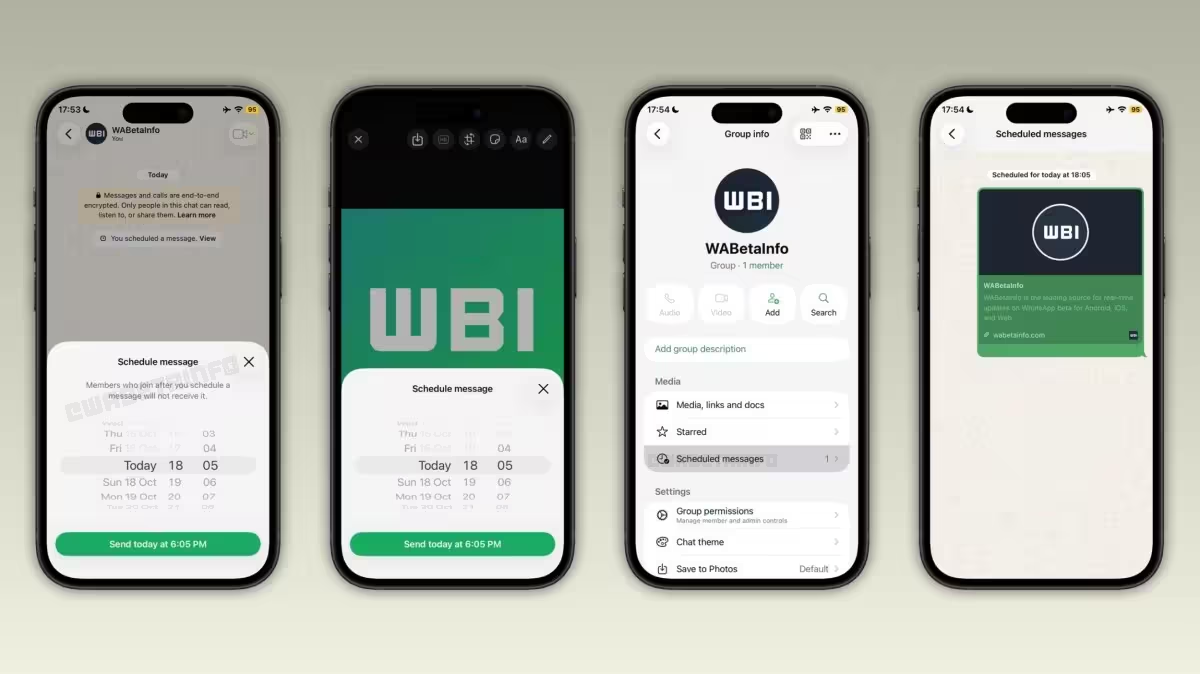
Scheduled content can include text, links, photos, and videos. Only one photo or video may be attached per scheduled message; to add media you use the drawing editor and tap and hold the send button there. Messages queued for future delivery are end-to-end encrypted and appear in a dedicated section on the chat info screen, where you can delete them at any time before they are sent. If you remove a scheduled message, the recipient is not notified.
In group chats, scheduled messages are delivered only to the people who were members of the group at the time you scheduled the message. Anyone who joins after scheduling will not receive that queued item.
WhatsApp has not given a firm date for general availability. It may take a few more weeks of testing and fixes before scheduled messages reach all users on iOS and Android; for now the rollout is limited to selected beta testers.


Leave a Comment
Comments
No comments yet. Be the first.