

2 Minutes
Google's Nano Banana image generator and editor has landed inside Samsung's Now Brief, bringing quick AI-powered photo transformations to Galaxy users. The integration offers one-tap creative edits pulled straight from your gallery — perfect for sprucing up selfies and pet photos.
What the Nano Banana card does in Now Brief
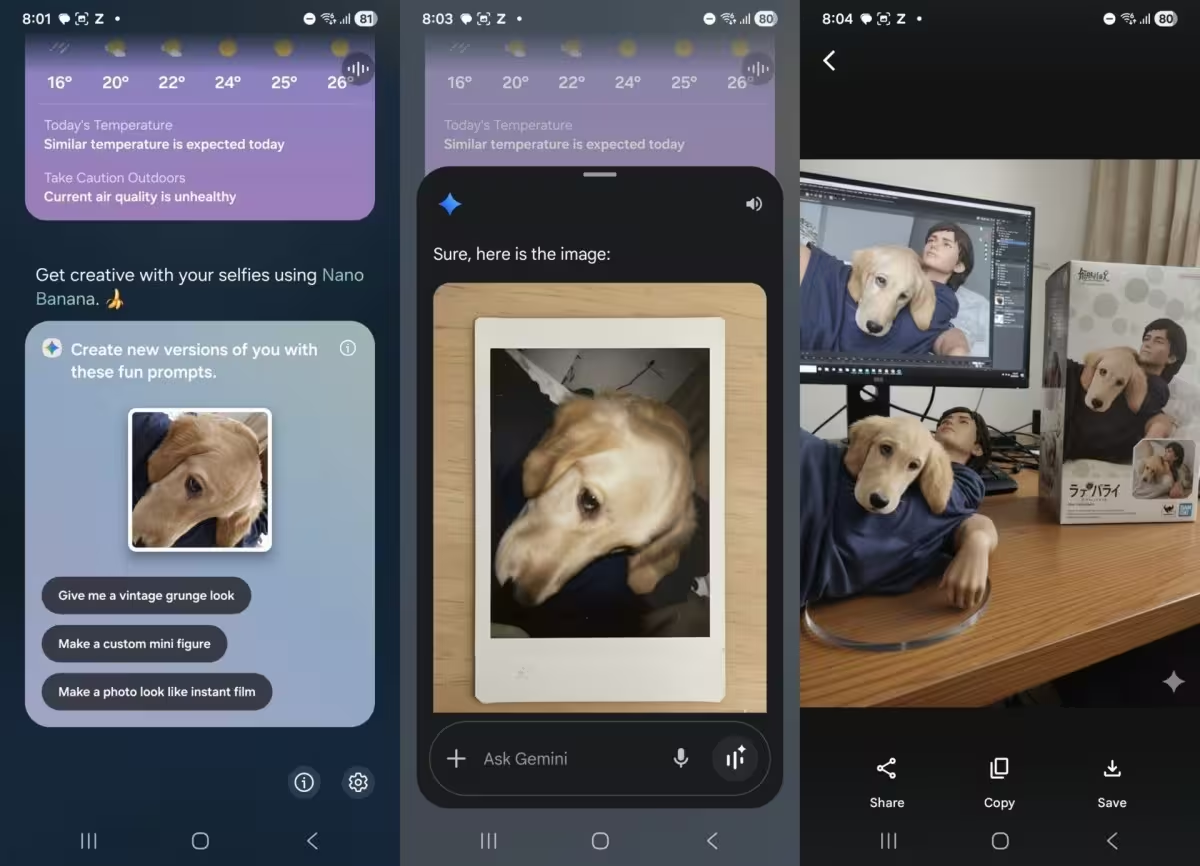
Now Brief now includes a Nano Banana image generation card that automatically selects a random selfie or pet photo from your gallery and suggests a handful of editing prompts. Tap any suggestion and Nano Banana produces an AI-transformed version of that image — from playful filters to stylized artwork.
How to turn it on (fast setup)
- Update the Personal Data Intelligence app from the Galaxy Store to the latest version.
- Open Now Brief settings and find the Content to include section.
- Enable the new toggle labeled Nano Banana image creation.
- That’s it — Now Brief will show a Nano Banana card with a daily random image and suggested prompts.
The card rotates the randomly chosen image once per day at the same time Now Brief generates its daily Memories recap, so you’ll see fresh suggestions each day.
Why this matters for Galaxy AI users
Integrating Nano Banana into Now Brief brings casual AI image editing into an already familiar daily recap flow. Instead of opening a separate app, users can discover creative edits while checking their Memories. It’s a small but smart move to keep AI image tools accessible and discoverable.
Tips, examples, and privacy notes
Prompts you might see include painterly, vintage, neon cyberpunk, or cartoon portrait styles. Want tighter control? Toggle Nano Banana off anytime in Now Brief settings. Because the feature pulls from your gallery, review app permissions and privacy settings in the Personal Data Intelligence app and your Samsung account if you have concerns about how images are processed or stored.
Bottom line: if you’re on a Galaxy device with Galaxy AI and enjoy playful photo edits, this integration makes it easier to turn everyday moments into shareable images without extra steps.



Leave a Comment
Comments
No comments yet. Be the first.